EviCore is continuing to roll out portal updates designed to reduce back-and-forth, cut down on system switching, and make everyday case management easier for you and your team. Here’s a look at what’s already live.
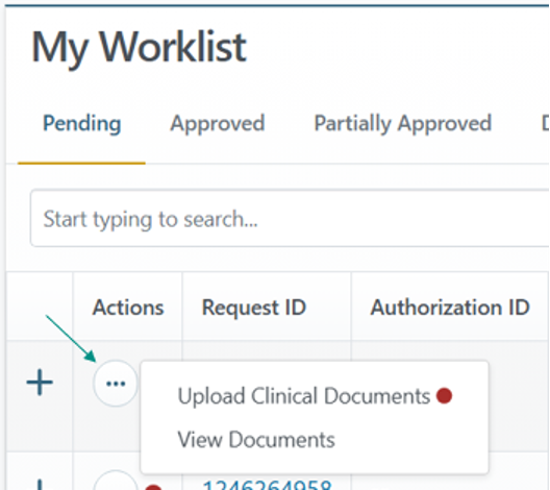
Take action directly from your Worklist.
You can now upload clinical documentation and view documents directly from the Worklist—no need to access the legacy system to manage your authorizations.
Look up an authorization directly within the platform.
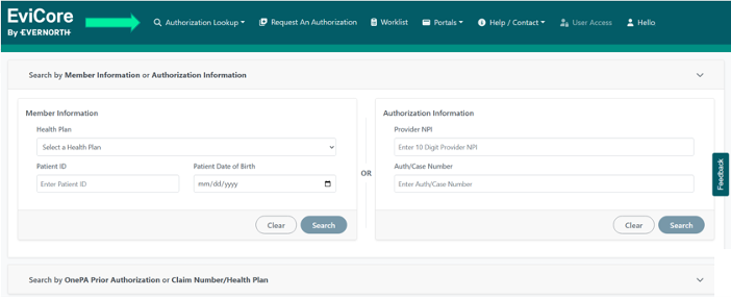
Important: For Peer-to-Peer (P2P) scheduling, withdrawing a request, or changing a CPT code or facility, please continue to access the authorization through the CareCore National Portal. Additional enhancements are on the way.
See a red dot in the clinical documents section? Here’s what it means.
When you’re working on a case, a red dot next to Upload Clinical in the Clinical Documents section indicates that a clinical attachment window is open and additional documents can be uploaded if needed. It doesn’t mean something went wrong with your submission.
A more efficient prior authorization submission process
EviCore has rolled out enhancements to the prior authorization submission experience within the provider portal.
These improvements are intended to:
- Reduce delays caused by missing or incomplete clinical documentation
- Support faster review and determination timeframes
- Minimize requests for additional information
- Create a more consistent, streamlined submission experience
This update is part of a broader industry effort led by AHIP to standardize electronic prior authorization requirements by taking a more proactive approach to the submission process.
In practice, the enhanced process shares the required clinical documentation before clinical review begins and gives you the ability to:
- Proceed with your complete clinical information
- Suspend the request in order to gather additional documentation, or
- Retract the request if the information isn’t available yet
What’s not changing:
- Clinical criteria and medical necessity requirements
- Real-time approval pathways when applicable
- The requirement for clinical information at submission for urgent requests
If your submission is suspended to gather additional documentation, you’ll have 4 calendar days to submit it. If the information isn’t received within that window, the request will be retracted.
Learn More
Review the FAQ guide or reach out to your Provider Engagement representative with questions.